


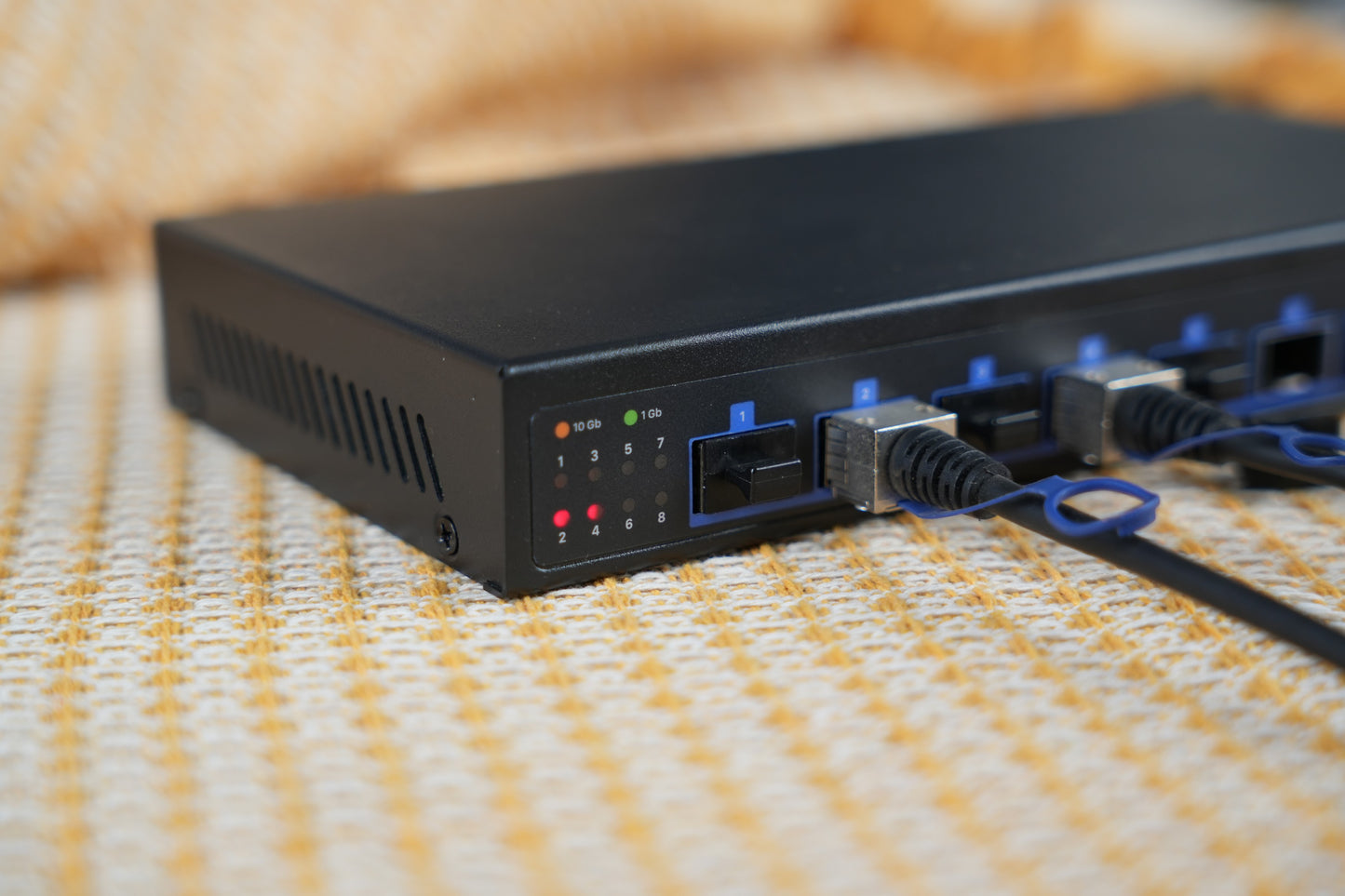
Dual SFP28
2× 25GbE networking.

Tested: ~21–22Gbps real-world throughput
2× 25GbE networking.
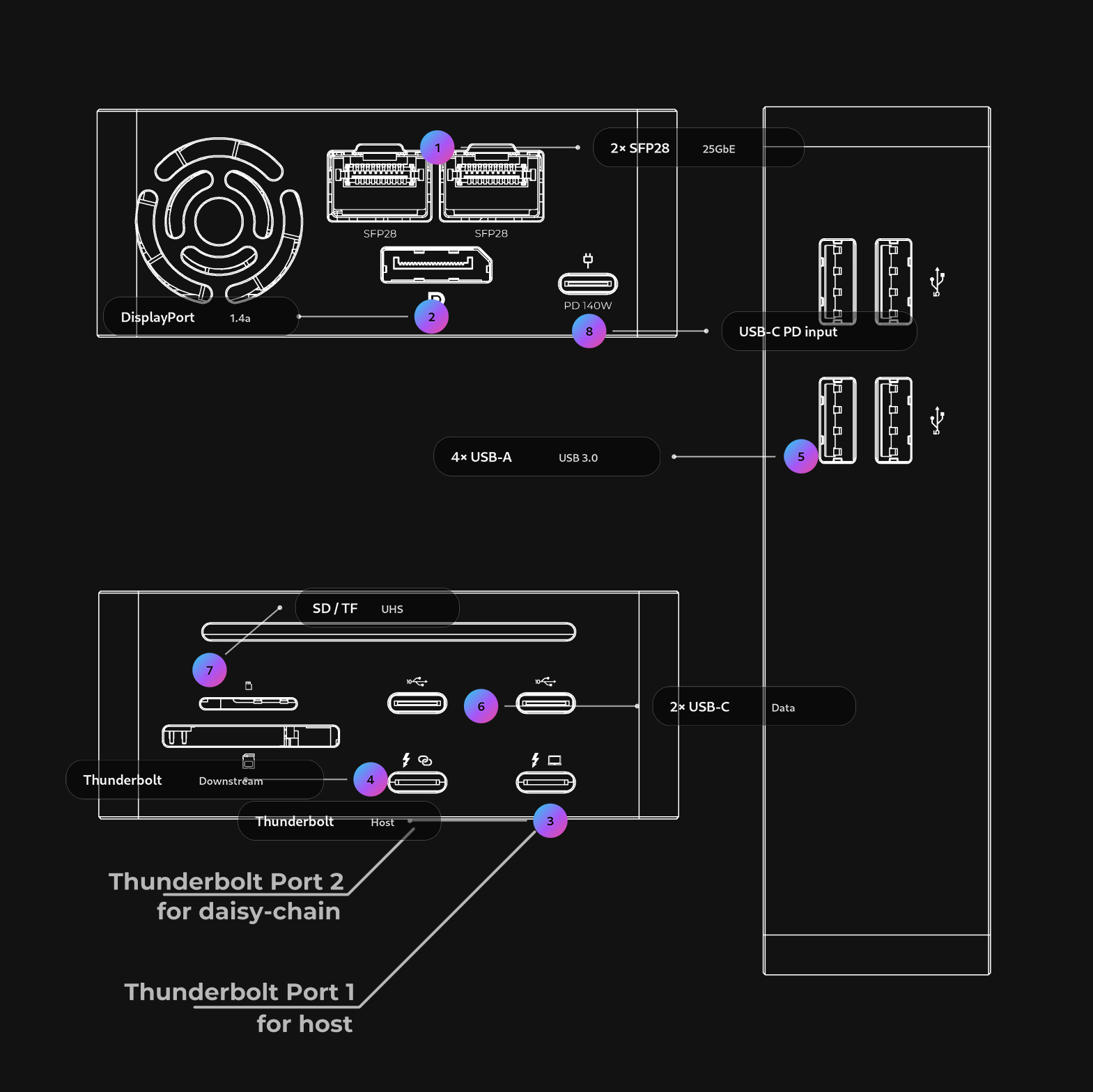
Display + I/O + 25G.
Stable power.
Charge while working.
Stack TB devices.
USB-C + USB-A.
Fast offload.
4K monitor out.
Real-world 25GbE workflows—from media production to IT infrastructure and portable labs.
Editors / NAS
Scrub & offload faster.
IT / SMB infra
Deploy & move data.
Homelab / Mini PC
25G without PCIe.
Portable 25GbE
Fast storage anywhere.

Dual ports aren’t about “double the speed.” They’re about flexibility—so your workflow stays fast even when the network changes.
Use 25G for your main link, and keep a second network for management, backup, or alternate access.

Bring power in once, and let LightOne handle the rest.
With USB-C PD input, it powers the dock and can deliver up to 85W to your host—keeping your workspace clean and predictable.

LightOne is built to replace the “pile of adapters.”
Display output, USB expansion, SD/TF access, charging, and 25GbE networking—all through one Thunderbolt connection.
Everything you need to understand the layout and speeds—right here on the page.
“ If you have a Thunderbolt equipped laptop or mini PC and want to access fast network storage, this is the best dock we have seen. ”
Real-world link utilization
On a 40Gbps Thunderbolt link, they saw ~21–22Gbps in testing (with a reported demo around 23.5Gbps).
Data-center NIC inside
They identified the 25GbE as an NVIDIA Mellanox ConnectX-4 Lx class solution—serious networking in a dock.
Daisy-chain ready
They described two Thunderbolt 3 ports plus additional USB-C ports, enabling streamlined chaining.
A “real dock” I/O mix
They called out DisplayPort 1.4a, SD slots, and four USB-A ports—ideal for mini PCs and laptops.
Power budgeting matters
They noted up to 85W to the host and highlighted practical budget headroom for compact systems.
Portable 25GbE workflow
They emphasized it’s small enough to travel—use it as a portable 25GbE adapter when needed.
“Amazing Experience! Customer support is awesome (They respond quickly), and the dock is super compact for what it is (It's half the size of my previous TB3 dock - Kensington SD5200T). I hope they go on to make other great products!”
“The LightOne arrived on Monday, and I immediately put it to use on a new project. I'm attaching some photos so you can see one of its many possibilities. But you've probably already seen it in a thousand different ways!”
Evidence-first performance. We recreated a clean chart style and credit the results to the ServeTheHome review (paraphrased).
Main result: ~21–22Gbps
Results vary by host, switch, optics/DAC and workload.
≥ 50% lower
Measured at about 38.7 dB(A) from ~50 cm under default settings— engineered for a calmer desk experience.
All key specs in one place—easy to compare, screenshot, and share.
Designed for professionals, backed by real people who stand behind the product.
Fast support from real engineers
Talk directly with the engineers who build LightOne—not scripted call centers. We diagnose and solve issues with you, quickly.
1-year hardware warranty included
Every unit is covered for 12 months against hardware failure under normal use. No hidden conditions.
Replacement-only policy
If a covered defect appears, we replace the unit directly. No repair queues. No waiting weeks. Just a new unit.
Compatibility, real-world bandwidth, and practical setup tips—kept here so it doesn’t interrupt the buying flow.
Yes—Thunderbolt is required for full functionality. USB4 hosts are supported because USB4 can include Thunderbolt compatibility, but not every USB-C/USB4 port behaves the same.
Because the device is ultimately constrained by the Thunderbolt 3 / 40Gbps link, plus real protocol overhead (PCIe/USB/TB tunneling, framing, etc.). Real-world throughput will land below the raw 40Gbps number. See the independent review for measured results. ServeTheHome
Think flexibility, not “two ports at 25G at once.” Both ports share the Thunderbolt uplink budget, so total throughput is bounded by the TB connection. The second port is most valuable for:
Independent review discusses the dual-port value in practice. ServeTheHome
For easiest setup, we recommend starting with passive SFP28 DAC cables for short runs (lowest fuss, low latency). For longer runs, use 25G SR optical modules + OM3/OM4 fiber.
If you tell us your switch/NIC model and distance, we can suggest a safe pairing.
No. SFP28 modules and DACs vary by distance, switch/NIC compatibility, and whether you need fiber or copper. We keep LightOne flexible so you can choose what fits your infrastructure.
Windows: supported. Linux: supported (kernel/driver availability depends on distro). macOS: networking is supported, but jumbo frames are not supported on macOS at this time.
For best results, keep OS and Thunderbolt/USB4 firmware up to date.
LightOne uses active cooling designed for sustained 25GbE workloads. We’ve also updated the fan and achieved at least 50% lower noise vs. the previous revision, with a smarter fan curve for a calmer desk experience.
Display output is DisplayPort 1.4, supporting up to 4K @ 60Hz (host and display capability dependent).
It means LightOne can deliver up to 85W of USB-C power to your host while handling I/O and networking. Actual charge rate depends on your laptop/tablet’s negotiated USB-C PD profile and system load. Review also notes host power behavior. ServeTheHome
Power input requirement is DC 24V 5A or USB-C PD 3.1 24V 5A. Using a proper high-output PD 3.1 supply helps keep performance stable under heavy 25GbE + I/O workloads.
In general, LightOne works with standard SFP28 modules and 25G DAC cables, but interoperability can vary by vendor coding/whitelists on some switches/NICs.


